> ## Documentation Index
> Fetch the complete documentation index at: https://turnkey-0e7c1f5b-landon-emaildocs.mintlify.site/llms.txt
> Use this file to discover all available pages before exploring further.
# Email auth & recovery
> Email Authentication enables users to authenticate and recover their Turnkey accounts using email-based verification. There are two methods of email authentication:
#### One-time password
* Uses a 6-9 digit or bech32 alphanumeric one-time password sent via email
* Simple, and familiar user experience
**One-Time Password Sandbox Environment**
To test OTP codes in our sandbox environment you can use the following:
* `alphanumeric` must be set to `false`
* `otpLength` must be set to `6`
* Email: [user@example.com](mailto:user@example.com)
* OTP Code: `000000`
#### Credential bundle
* Sends an encrypted API key credential directly via email
* Alternative method for specific use cases
* More secure, but requires copying the full credential to the client
Both methods provide users with an expiring API key for authentication or account recovery.
## Core mechanism
Email Authentication is built with expiring API keys as the foundation. The two delivery mechanisms are:
### OTP-based method
The authentication process happens in two steps:
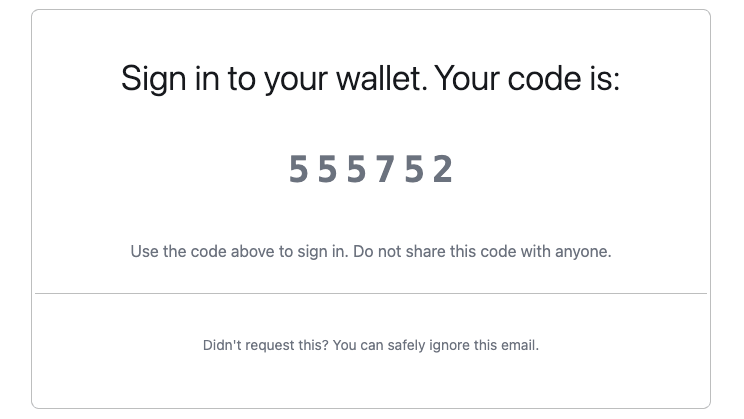
A 6-9 digit or alphanumeric OTP code is sent to the user's verified email address
Upon verification of the correct code, an API key credential is generated and encrypted for the client
### Credential bundle method
This method is only supported by **legacy iframe-based flows** and is not available in the current Turnkey SDKs.
The API key credential is encrypted and delivered directly through email to the user. Once the credential is live on the client side (within the context of an iframe), it is readily available to stamp (authenticate) requests. See the [enclave to end-user secure channel](/security/enclave-secure-channels) for more info on how we achieve secure delivery.
This flow remains available for existing legacy integrations but is not recommended for new implementations.
As an alternative, we recommend using the email OTP flow, which is fully supported by the current SDKs. An example that sends a magic link using [magicLinkTemplate](https://docs.turnkey.com/authentication/email#email-auth-and-recovery:~:text=height%20of%20124px-,magicLinkTemplate,-%3A%20a%20template%20for) can be found [here](https://github.com/tkhq/sdk/tree/main/examples/authentication/magic-link-auth).
### Email recovery
In Turnkey, email recovery **does not refer to a separate, recovery-only email address** (as commonly used in consumer products, where a recovery email can reset access but cannot itself be used to sign in).
Instead, it means **adding email as an authentication method for a user**. Once added, that user can authenticate using email by default, alongside any other configured authenticators (such as passkeys, social logins or external wallets).
The legacy iframe-based flow using `INIT_USER_EMAIL_RECOVERY` and `RECOVER_USER` still exists for backward compatibility with older integrations. These flows ultimately attach new authentication material (for example, a passkey) to the user. They are being deprecated and **should not be used for new integrations**.
## Prerequisites
Make sure you have set up your primary Turnkey organization with at least one API user that can programmatically initiate email auth and create suborganizations. Check out our [Quickstart guide](/get-started/quickstart) if you need help getting started. To allow an API user to initiate email auth, you'll need the following policy in your main organization:
```json theme={null}
{
"effect": "EFFECT_ALLOW",
"consensus": "approvers.any(user, user.id == '')",
"condition": "(activity.resource == 'AUTH' && activity.action == 'CREATE') || (activity.resource == 'ORGANIZATION' && activity.action == 'CREATE')"
}
```
For OTP Auth signup and login flows you will need a user with the following policy
```json theme={null}
{
"effect": "EFFECT_ALLOW",
"consensus": "approvers.any(user, user.id == '')",
"condition": "(activity.resource == 'AUTH' && activity.action == 'CREATE') || (activity.resource == 'OTP' && activity.action == 'CREATE') || (activity.resource == 'OTP' && activity.action == 'VERIFY') || (activity.resource == 'ORGANIZATION' && activity.action == 'CREATE')"
}
```
Avoid using an API key that is also present in the sub-organization that you're targeting within the email activities. Turnkey identifies the user from the request signature and in case of an identical API key it will always prioritize the sub-organization user matching. As a result, it will try to evaluate the sub-organization policies instead of the parent ones.
## User experience
### OTP-based authentication flow
The flow begins with a new activity of type `ACTIVITY_TYPE_INIT_OTP_V3` using the parent organization id with these parameters:
* `otpType`: specify `"OTP_TYPE_EMAIL"`
* `contact`: user's email address
* `emailCustomization`: optional parameters for customizing emails
* `userIdentifier`: optional parameter for rate limiting SMS OTP requests per user. We recommend generating this server-side based on the user's IP address or public key. See the [OTP Rate Limits](#otp-rate-limits) section below for more details.
* `alphanumeric`: optional parameter for making this code bech32 alphanumeric or not. default: true
* `otpLength`: optional parameter for selecting the length of the OTP. default: 9
* `expirationSeconds`: optional validity window (defaults to 5 minutes)
* `sendFromEmailAddress` : optional custom email address from which to send the OTP email
* `sendFromEmailSenderName` : optional custom sender name for use with sendFromEmailAddress; if left empty, will default to ‘Notifications’
* `replyToEmailAddress` : optional custom email address to use as reply-to
The response to `ACTIVITY_TYPE_INIT_OTP_V3` includes an `otpEncryptionTargetBundle` which is used in OTP verification. After receiving the OTP, users complete OTP verification with `ACTIVITY_TYPE_VERIFY_OTP_V2` using the parent organization id which returns a verificationToken JWT:
* `otpId`: ID from the init activity
* `encryptedOtpBundle`: bundle generated using the otpEncryptionTargetBundle received during `ACTIVITY_TYPE_INIT_OTP_V3` and contains the 6-9 digit or alphanumeric code received via email, and the public key of a client-side generated keypair.
* `expirationSeconds`: optional validity window (defaults to 1 hour)
After receiving the verification token, users complete OTP authentication flow with `ACTIVITY_TYPE_OTP_LOGIN_V2` using the sub-organization ID associated with the contact from the first step:
* `publicKey`: public key to add to organization data associated with the signing key in IndexedDB or SecureStorage.
* `verificationToken`: JWT returned from successful `VERIFY_OTP` activity
* `clientSignature`: This proves authorization for the verification token being used, and is generated using the keypair whose public key was provided in the `encryptedOtpBundle` during verification.
* `expirationSeconds`: optional validity window (defaults to 15 minutes)
* `invalidateExisting`: optional boolean to invalidate previous login sessions
Upgrading a legacy OTP integration, SDK Browser/Server/React from before 6.0, or Wallet Kit/Core from before 2.0? Follow the [OTP migration guide](/features/authentication/otp-migration-guide) to update activity versions, encrypted bundles, client signatures, and policies.
 ### Sub-organization initiated OTP
By default, the OTP flow is performed by the parent organization using an API key with sufficient permissions. Sub-organizations can also run the full flow directly — the sub-org's root user (or any user with a policy permitting OTP creation and verification) can initiate it without involving the parent backend.
All activities are stamped using valid sub-organization credentials, with `organizationId` set to the sub-org ID throughout:
Call `ACTIVITY_TYPE_INIT_OTP_V3` with `organizationId` set to the sub-org ID, stamped with the sub-org's API key
Call `ACTIVITY_TYPE_VERIFY_OTP_V2` with the same sub-org ID and API key to receive a `verificationToken`
Use the `verificationToken` to complete one of the following:
* `ACTIVITY_TYPE_OTP_LOGIN_V2` — authenticate and create a new session
* `ACTIVITY_TYPE_UPDATE_USER_EMAIL` — verify and update the user's email address
* `ACTIVITY_TYPE_UPDATE_USER_PHONE` — verify and update the user's phone number
The `verificationToken` is scoped to the issuing organization. Parent-issued tokens can be used by any sub-organization; sub-org-issued tokens are limited to that sub-org only.
### OTP rate limits
In order to safeguard users, Turnkey enforces rate limits for OTP auth activities. If a `userIdentifier` parameter is provided, the following limits are enforced:
* 3 requests per 3 minutes per unique `userIdentifier`
* 3 retries max per code, after which point that code will be locked
* 3 active codes per user, each with a 5 minute TTL
### Credential bundle authentication flow
This alternative method uses `ACTIVITY_TYPE_EMAIL_AUTH` with these parameters:
* `email`: user's email address (must match their registered email)
* `targetPublicKey`: public key for credential encryption
* `apiKeyName`: optional name (defaults to `Email Auth - `)
* `expirationSeconds`: optional validity window (defaults to 15 minutes)
* `emailCustomization`: optional parameters for customizing emails
* `invalidateExisting`: optional boolean to invalidate previous Email Auth API keys
### Sub-organization initiated OTP
By default, the OTP flow is performed by the parent organization using an API key with sufficient permissions. Sub-organizations can also run the full flow directly — the sub-org's root user (or any user with a policy permitting OTP creation and verification) can initiate it without involving the parent backend.
All activities are stamped using valid sub-organization credentials, with `organizationId` set to the sub-org ID throughout:
Call `ACTIVITY_TYPE_INIT_OTP_V3` with `organizationId` set to the sub-org ID, stamped with the sub-org's API key
Call `ACTIVITY_TYPE_VERIFY_OTP_V2` with the same sub-org ID and API key to receive a `verificationToken`
Use the `verificationToken` to complete one of the following:
* `ACTIVITY_TYPE_OTP_LOGIN_V2` — authenticate and create a new session
* `ACTIVITY_TYPE_UPDATE_USER_EMAIL` — verify and update the user's email address
* `ACTIVITY_TYPE_UPDATE_USER_PHONE` — verify and update the user's phone number
The `verificationToken` is scoped to the issuing organization. Parent-issued tokens can be used by any sub-organization; sub-org-issued tokens are limited to that sub-org only.
### OTP rate limits
In order to safeguard users, Turnkey enforces rate limits for OTP auth activities. If a `userIdentifier` parameter is provided, the following limits are enforced:
* 3 requests per 3 minutes per unique `userIdentifier`
* 3 retries max per code, after which point that code will be locked
* 3 active codes per user, each with a 5 minute TTL
### Credential bundle authentication flow
This alternative method uses `ACTIVITY_TYPE_EMAIL_AUTH` with these parameters:
* `email`: user's email address (must match their registered email)
* `targetPublicKey`: public key for credential encryption
* `apiKeyName`: optional name (defaults to `Email Auth - `)
* `expirationSeconds`: optional validity window (defaults to 15 minutes)
* `emailCustomization`: optional parameters for customizing emails
* `invalidateExisting`: optional boolean to invalidate previous Email Auth API keys
 ## Email customization
We offer customization for the following:
* `appName`: the name of the application. This will be used in the email's subject, e.g. `Sign in to ${appName}`
* `logoUrl`: a link to a PNG with a max width of 340px and max height of 124px
* `magicLinkTemplate`: a template for the URL to be used in the magic link button, e.g. `https://dapp.xyz/%s`. The auth bundle will be interpolated into the `%s`
```js theme={null}
// Sign and submits the EMAIL_AUTH activity
const response = await client.emailAuth({
type: "ACTIVITY_TYPE_EMAIL_AUTH",
timestampMs: String(Date.now()),
organizationId: ,
parameters: {
email: ,
targetPublicKey: ,
apiKeyName: ,
expirationSeconds: ,
emailCustomization: {
appName: ,
logoUrl: ,
magicLinkTemplate:
}
},
});
```
### Breaking change: `appName` required
**Effective December 16, 2025**
Beginning December 16, 2025, all email-based OTP and recovery activities will require the `appName` parameter. Existing SDK versions will continue working, but upgrading without setting an `appName` will break email-based flows.
**Auth Proxy users** — Set `appName` under [email configuration](https://app.turnkey.com/dashboard/walletKit) in the dashboard.
**Server SDK users** — If you call `init_otp_auth`, `init_otp`, `email_recovery`, or `email_auth` without `appName`:
* For `email_recovery` or `email_auth`: include `appName` in your request
* For `init_otp` or `init_otp_auth`: update your API call to match the new input structure when upgrading to the latest server SDK
**`emailAuth` and `emailRecovery`** — both methods use the same parameter structure:
```js theme={null}
await client.emailAuth({
parameters: {
email: "user@example.com",
targetPublicKey: "",
emailCustomization: {
appName: "Your App Name" // this is now required
}
}
});
```
**`initOtp` and `initOtpAuth`** — both methods use the same parameter structure:
```js theme={null}
await client.initOtp({
parameters: {
otpType: "OTP_TYPE_EMAIL",
contact: "user@example.com",
appName: "Your App Name", // this is now required
emailCustomization: {
// other optional customization
}
}
});
```
If you manage email flows with policies, update to the new activity types:
| **Flow** | **Old activity type** | **New activity type** |
| :---------------- | :-------------------------------------------------------------- | :------------------------------------------ |
| Email auth | `ACTIVITY_TYPE_EMAIL_AUTH`, `ACTIVITY_TYPE_EMAIL_AUTH_V2` | `ACTIVITY_TYPE_EMAIL_AUTH_V3` |
| Init OTP auth | `ACTIVITY_TYPE_INIT_OTP_AUTH`, `ACTIVITY_TYPE_INIT_OTP_AUTH_V2` | `ACTIVITY_TYPE_INIT_OTP_AUTH_V3` |
| Init OTP (signup) | `ACTIVITY_TYPE_INIT_OTP`, `ACTIVITY_TYPE_INIT_OTP_V2` | `ACTIVITY_TYPE_INIT_OTP_V3` |
| Verify OTP | `ACTIVITY_TYPE_VERIFY_OTP` | `ACTIVITY_TYPE_VERIFY_OTP_V2` |
| OTP login | `ACTIVITY_TYPE_OTP_LOGIN` | `ACTIVITY_TYPE_OTP_LOGIN_V2` |
| Email recovery | `ACTIVITY_TYPE_INIT_USER_EMAIL_RECOVERY` | `ACTIVITY_TYPE_INIT_USER_EMAIL_RECOVERY_V2` |
### Email templates
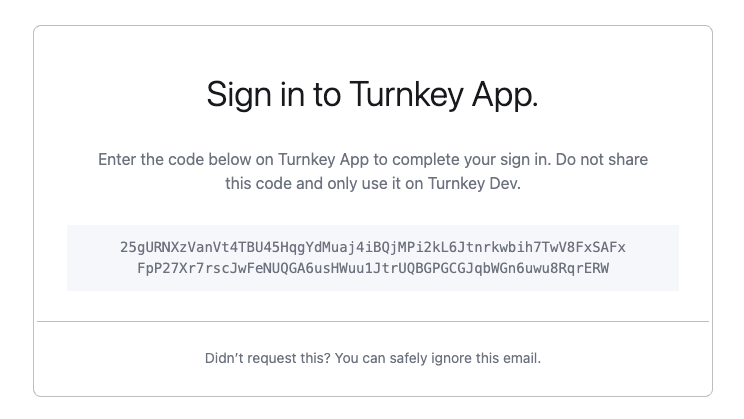
We also support custom HTML email templates for [Enterprise](https://www.turnkey.com/pricing) clients on the **Scale** tier. This allows you to inject arbitrary data from a JSON string containing key-value pairs. In this case, the `emailCustomization` variable may look like:
```js theme={null}
...
emailCustomization: {
templateId: ,
templateVariables: "{\"username\": \"alice and bob\"}"
}
...
```
In this specific example, the value `alice and bob` can be interpolated into the email template using the key `username`, referenced in the template with `{{ index .TemplateVariables "username" }}`.
The use of such template variables is purely optional.
Here’s an example of a custom HTML email template that includes the OTP code, referenced within the markup as `{{ .OtpCode }}`.
For best compatibility across email providers, make sure to use PNG images within your templates.
## Email customization
We offer customization for the following:
* `appName`: the name of the application. This will be used in the email's subject, e.g. `Sign in to ${appName}`
* `logoUrl`: a link to a PNG with a max width of 340px and max height of 124px
* `magicLinkTemplate`: a template for the URL to be used in the magic link button, e.g. `https://dapp.xyz/%s`. The auth bundle will be interpolated into the `%s`
```js theme={null}
// Sign and submits the EMAIL_AUTH activity
const response = await client.emailAuth({
type: "ACTIVITY_TYPE_EMAIL_AUTH",
timestampMs: String(Date.now()),
organizationId: ,
parameters: {
email: ,
targetPublicKey: ,
apiKeyName: ,
expirationSeconds: ,
emailCustomization: {
appName: ,
logoUrl: ,
magicLinkTemplate:
}
},
});
```
### Breaking change: `appName` required
**Effective December 16, 2025**
Beginning December 16, 2025, all email-based OTP and recovery activities will require the `appName` parameter. Existing SDK versions will continue working, but upgrading without setting an `appName` will break email-based flows.
**Auth Proxy users** — Set `appName` under [email configuration](https://app.turnkey.com/dashboard/walletKit) in the dashboard.
**Server SDK users** — If you call `init_otp_auth`, `init_otp`, `email_recovery`, or `email_auth` without `appName`:
* For `email_recovery` or `email_auth`: include `appName` in your request
* For `init_otp` or `init_otp_auth`: update your API call to match the new input structure when upgrading to the latest server SDK
**`emailAuth` and `emailRecovery`** — both methods use the same parameter structure:
```js theme={null}
await client.emailAuth({
parameters: {
email: "user@example.com",
targetPublicKey: "",
emailCustomization: {
appName: "Your App Name" // this is now required
}
}
});
```
**`initOtp` and `initOtpAuth`** — both methods use the same parameter structure:
```js theme={null}
await client.initOtp({
parameters: {
otpType: "OTP_TYPE_EMAIL",
contact: "user@example.com",
appName: "Your App Name", // this is now required
emailCustomization: {
// other optional customization
}
}
});
```
If you manage email flows with policies, update to the new activity types:
| **Flow** | **Old activity type** | **New activity type** |
| :---------------- | :-------------------------------------------------------------- | :------------------------------------------ |
| Email auth | `ACTIVITY_TYPE_EMAIL_AUTH`, `ACTIVITY_TYPE_EMAIL_AUTH_V2` | `ACTIVITY_TYPE_EMAIL_AUTH_V3` |
| Init OTP auth | `ACTIVITY_TYPE_INIT_OTP_AUTH`, `ACTIVITY_TYPE_INIT_OTP_AUTH_V2` | `ACTIVITY_TYPE_INIT_OTP_AUTH_V3` |
| Init OTP (signup) | `ACTIVITY_TYPE_INIT_OTP`, `ACTIVITY_TYPE_INIT_OTP_V2` | `ACTIVITY_TYPE_INIT_OTP_V3` |
| Verify OTP | `ACTIVITY_TYPE_VERIFY_OTP` | `ACTIVITY_TYPE_VERIFY_OTP_V2` |
| OTP login | `ACTIVITY_TYPE_OTP_LOGIN` | `ACTIVITY_TYPE_OTP_LOGIN_V2` |
| Email recovery | `ACTIVITY_TYPE_INIT_USER_EMAIL_RECOVERY` | `ACTIVITY_TYPE_INIT_USER_EMAIL_RECOVERY_V2` |
### Email templates
We also support custom HTML email templates for [Enterprise](https://www.turnkey.com/pricing) clients on the **Scale** tier. This allows you to inject arbitrary data from a JSON string containing key-value pairs. In this case, the `emailCustomization` variable may look like:
```js theme={null}
...
emailCustomization: {
templateId: ,
templateVariables: "{\"username\": \"alice and bob\"}"
}
...
```
In this specific example, the value `alice and bob` can be interpolated into the email template using the key `username`, referenced in the template with `{{ index .TemplateVariables "username" }}`.
The use of such template variables is purely optional.
Here’s an example of a custom HTML email template that includes the OTP code, referenced within the markup as `{{ .OtpCode }}`.
For best compatibility across email providers, make sure to use PNG images within your templates.
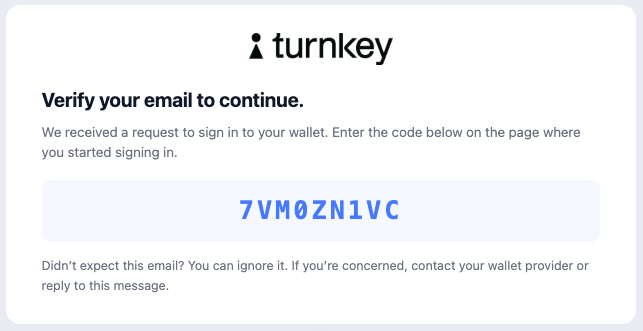 **Bespoke HTML templates** and **custom email sender domains** are available to [**Enterprise clients**](https://www.turnkey.com/pricing) on the **Scale tier** or higher.
If you are interested in implementing bespoke, fully-customized email templates, please reach out to [hello@turnkey.com](mailto:hello@turnkey.com).
### Custom email sender domain
[Enterprise](https://www.turnkey.com/pricing) clients can also customize the email sender domain. To get set up, please reach out to your Turnkey rep to get started but here is what you'll be able to configure:
```js theme={null}
// Optional custom email address from which to send the OTP email
"sendFromEmailAddress": "notifs@mail.domain.com"
// Optional custom sender name
"sendFromEmailSenderName": "MyApp Notifications"
// Optional reply-to email address
"replyToEmailAddress": "reply@mail.domain.com"
```
Please keep in mind that:
* Email has to be from a pre-whitelisted domain
* If there is no `sendFromEmailAddress` or it's invalid, the other two fields are ignored
* If `sendFromEmailSenderName` is absent, it defaults to "Notifications" (again, ONLY if `sendFromEmailAddress` is present and valid)
* If `replyToEmailAddress` is absent, then there is no reply-to added. If it is present, it must ALSO be from a valid, whitelisted domain, but it doesn't have to be the same email address as the `sendFromEmailAddress` one (though once again, this first one MUST be present, or the other two feature are ignored)
* **Sender name screening:** Some email clients (e.g. Gmail) screen sender names more aggressively than others (e.g. Apple Mail), which can lead to inconsistent display across clients. To ensure a consistent experience, keep your `sendFromEmailSenderName` "safe looking" — avoid underscores, special symbols, or unusual formatting that may cause it to be filtered or hidden.
If you are interested in implementing bespoke, fully-customized email templates and sender domain, please reach out to [hello@turnkey.com](mailto:hello@turnkey.com).
### Authorization
Authorization is managed through our [policy engine](/features/policies/overview):
### Authentication
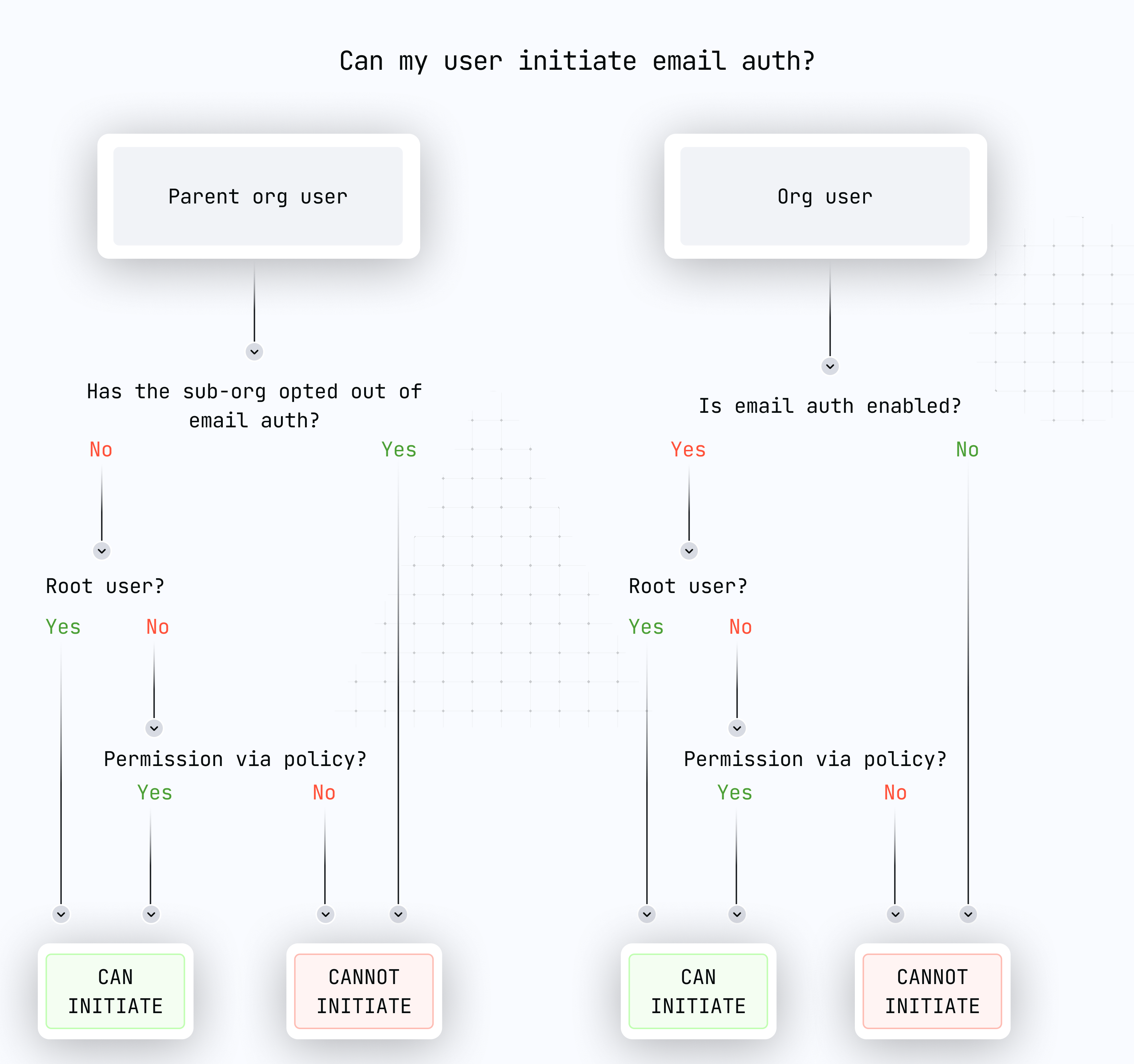
Both OTP-based and credential bundle authentication activities:
* Can be performed by [root quorum](/features/users/root-quorum#root-quorum) or users with proper policy authorization
* Require the respective feature to be enabled in the organization and sub-organization
* Can target any user in the organization or sub-organizations
Specifically:
* For OTP-based auth (current): `ACTIVITY_TYPE_INIT_OTP_V3`, `ACTIVITY_TYPE_VERIFY_OTP_V2`, and `ACTIVITY_TYPE_OTP_LOGIN_V2`
* For credential bundle auth: `ACTIVITY_TYPE_EMAIL_AUTH`
**Bespoke HTML templates** and **custom email sender domains** are available to [**Enterprise clients**](https://www.turnkey.com/pricing) on the **Scale tier** or higher.
If you are interested in implementing bespoke, fully-customized email templates, please reach out to [hello@turnkey.com](mailto:hello@turnkey.com).
### Custom email sender domain
[Enterprise](https://www.turnkey.com/pricing) clients can also customize the email sender domain. To get set up, please reach out to your Turnkey rep to get started but here is what you'll be able to configure:
```js theme={null}
// Optional custom email address from which to send the OTP email
"sendFromEmailAddress": "notifs@mail.domain.com"
// Optional custom sender name
"sendFromEmailSenderName": "MyApp Notifications"
// Optional reply-to email address
"replyToEmailAddress": "reply@mail.domain.com"
```
Please keep in mind that:
* Email has to be from a pre-whitelisted domain
* If there is no `sendFromEmailAddress` or it's invalid, the other two fields are ignored
* If `sendFromEmailSenderName` is absent, it defaults to "Notifications" (again, ONLY if `sendFromEmailAddress` is present and valid)
* If `replyToEmailAddress` is absent, then there is no reply-to added. If it is present, it must ALSO be from a valid, whitelisted domain, but it doesn't have to be the same email address as the `sendFromEmailAddress` one (though once again, this first one MUST be present, or the other two feature are ignored)
* **Sender name screening:** Some email clients (e.g. Gmail) screen sender names more aggressively than others (e.g. Apple Mail), which can lead to inconsistent display across clients. To ensure a consistent experience, keep your `sendFromEmailSenderName` "safe looking" — avoid underscores, special symbols, or unusual formatting that may cause it to be filtered or hidden.
If you are interested in implementing bespoke, fully-customized email templates and sender domain, please reach out to [hello@turnkey.com](mailto:hello@turnkey.com).
### Authorization
Authorization is managed through our [policy engine](/features/policies/overview):
### Authentication
Both OTP-based and credential bundle authentication activities:
* Can be performed by [root quorum](/features/users/root-quorum#root-quorum) or users with proper policy authorization
* Require the respective feature to be enabled in the organization and sub-organization
* Can target any user in the organization or sub-organizations
Specifically:
* For OTP-based auth (current): `ACTIVITY_TYPE_INIT_OTP_V3`, `ACTIVITY_TYPE_VERIFY_OTP_V2`, and `ACTIVITY_TYPE_OTP_LOGIN_V2`
* For credential bundle auth: `ACTIVITY_TYPE_EMAIL_AUTH`
 ### Example implementations
* [OTP Auth Example](https://github.com/tkhq/sdk/tree/main/examples/authentication/otp-auth)
* [Email Auth Example](https://github.com/tkhq/sdk/tree/main/examples/authentication/email-auth)
* [Demo Embedded Wallet](https://wallet.tx.xyz) ([code](https://github.com/tkhq/demo-embedded-wallet))
## Implementation in organizations
For organizations accessed via dashboard:
1. Ensure the required features are enabled:
* `FEATURE_NAME_OTP_EMAIL_AUTH` for OTP-based authentication
* `FEATURE_NAME_EMAIL_AUTH` for credential bundle authentication
2. Users initiating the request must have appropriate permissions
## Opting out
Organizations can disable email-based features if their security model requires it:
Use `ACTIVITY_TYPE_REMOVE_ORGANIZATION_FEATURE` to disable:
* `FEATURE_NAME_OTP_EMAIL_AUTH` for OTP-based authentication
* `FEATURE_NAME_EMAIL_AUTH` for credential bundle authentication
When creating sub-organizations, use:
* `disableOtpEmailAuth` parameter for OTP-based authentication
* `disableEmailAuth` parameter for credential bundle authentication
## Implementation notes
* Users are limited to:
* 10 long-lived API keys
* 10 expiring API keys (oldest are discarded when limit is reached)
### For top-level organizations
* Both authentication methods are disabled by default
* Must be enabled via `ACTIVITY_TYPE_SET_ORGANIZATION_FEATURE`
### For sub-organizations
* Both authentication methods are enabled by default
* Can be disabled during creation using `CreateSubOrganizationIntentV7` activity parameters
Example of enabling OTP-based Email Auth:
```bash theme={null}
turnkey request --host api.turnkey.com --path /public/v1/submit/set_organization_feature --body '{
"timestampMs": "'"$(date +%s)"'000",
"type": "ACTIVITY_TYPE_SET_ORGANIZATION_FEATURE",
"organizationId": "",
"parameters": {
"name": "FEATURE_NAME_OTP_EMAIL_AUTH"
}
}' --organization
```
Example of enabling credential bundle Email Auth:
```bash theme={null}
turnkey request --host api.turnkey.com --path /public/v1/submit/set_organization_feature --body '{
"timestampMs": "'"$(date +%s)"'000",
"type": "ACTIVITY_TYPE_SET_ORGANIZATION_FEATURE",
"organizationId": "",
"parameters": {
"name": "FEATURE_NAME_EMAIL_AUTH"
}
}' --organization
```
## Email delivery events
Email self serve gives you visibility into email delivery events sent from your parent
organization. Use it to confirm whether an email was delivered, investigate delayed delivery, and
debug recipient-side failures such as bounces or complaints.
* Parent organization scoped event history
* Per-recipient lookup by email address
* Optional filtering by event type
* Cursor-based pagination for delivery history
Email event lookup is scoped to the authenticated organization. If the request originated from a
sub-organization, the events are read from the parent organization.
### Event types
Email events represent the delivery lifecycle reported by Turnkey's email provider.
| Event type | Description |
| --------------- | ----------------------------------------------------------------- |
| `Send` | The email was accepted for sending. |
| `Delivery` | The email was delivered to the recipient's mail server. |
| `DeliveryDelay` | Delivery was delayed and will be retried later. |
| `Bounce` | The recipient's mail server rejected the email. |
| `Complaint` | The recipient or mailbox provider reported the email as unwanted. |
The Dashboard may display these in a more user-friendly form:
| Dashboard status | API event type | Meaning |
| ---------------- | --------------- | -------------------------------------------------------------- |
| Delivered | `Delivery` | The email was delivered to the recipient. |
| Delivery delayed | `DeliveryDelay` | Delivery was delayed by the email provider and may be retried. |
| Bounced | `Bounce` | The recipient's mail server rejected the email. |
| Complained | `Complaint` | The recipient or provider reported the message as unwanted. |
### Before you begin
* **Email is required.** Event lookup is recipient-based and requires an email address.
* **Email addresses are normalized.** The API normalizes `email` to lowercase server-side.
* **Results are newest first.** The most recent events are returned first.
### How it works
Provide the recipient email address you want to inspect.
Optionally pass `eventType` to show only sends, deliveries, delays, bounces, or complaints.
Use `paginationOptions.limit`, `paginationOptions.after`, and `paginationOptions.before` to
move through event history.
Use fields such as `eventType`, `timestamp`, `fromAddress`, `toAddress`, and `details` to
understand what happened to the message.
### API reference
This endpoint uses `HTTP POST` and requires a signed request body stamped with your API key.
| Endpoint | Description |
| ----------------------------------------- | ---------------------------------------------- |
| `POST /public/v1/query/list_email_events` | Retrieve email delivery events for a recipient |
#### List email events
Retrieves email delivery events for a recipient in the authenticated organization.
#### Request body
```json Request body theme={null}
{
"organizationId": "",
"email": "user@example.com",
"paginationOptions": {
"limit": "10"
}
}
```
| Field | Type | Required | Description |
| -------------------------- | ------ | -------- | ---------------------------------------------------------------------------------------------------------- |
| `organizationId` | string | Yes | Customer organization ID. |
| `email` | string | Yes | Recipient email address to list events for. Normalized to lowercase server-side. |
| `eventType` | string | No | Exact event type filter. Useful values are `Send`, `Delivery`, `Bounce`, `DeliveryDelay`, and `Complaint`. |
| `paginationOptions.limit` | string | No | Maximum number of rows to return, up to `100`. |
| `paginationOptions.after` | string | No | Cursor event ID for fetching results after that event. |
| `paginationOptions.before` | string | No | Cursor event ID for fetching results before that event. |
#### Response
```json Response theme={null}
{
"emailEvents": [
{
"id": "",
"organizationId": "",
"messageId": "",
"eventType": "Bounce",
"fromAddress": "no-reply@turnkey.com",
"toAddress": "user@example.com",
"senderTenant": "",
"timestamp": "1784840060374",
"createdAt": "1784840060374",
"details": {
"bounceType": "Permanent",
"bounceSubType": "General",
"diagnosticCode": "smtp; 550 5.1.1 user unknown",
"deliverySmtpResponse": "",
"deliveryProcessingTimeMillis": "0",
"deliveryDelayType": ""
}
}
]
}
```
### Data types
#### `EmailEvent` (response)
| Field | Type | Required | Description |
| ---------------- | ------ | -------- | -------------------------------------------------------------------- |
| `id` | string | Yes | Unique email event ID. Use this value with pagination cursors. |
| `organizationId` | string | Yes | Organization associated with the event. |
| `messageId` | string | Yes | Email provider message ID. |
| `eventType` | string | Yes | Event type, such as `Delivery`, `Bounce`, or `DeliveryDelay`. |
| `fromAddress` | string | Yes | Sender email address. |
| `toAddress` | string | Yes | Recipient email address. |
| `senderTenant` | string | No | Sender tenant associated with the event. |
| `timestamp` | string | Yes | Event timestamp in milliseconds. |
| `createdAt` | string | Yes | Record creation timestamp in milliseconds. |
| `details` | object | No | Provider-specific delivery details. Fields depend on the event type. |
#### `EmailEventDetails` (response)
| Field | Type | Required | Description |
| ------------------------------ | ------ | -------- | ------------------------------------------------------------- |
| `bounceType` | string | No | Bounce category, such as `Permanent` or `Transient`. |
| `bounceSubType` | string | No | More specific bounce reason. |
| `diagnosticCode` | string | No | SMTP diagnostic code returned by the recipient's mail server. |
| `deliverySmtpResponse` | string | No | SMTP response for a delivery event. |
| `deliveryProcessingTimeMillis` | string | No | Time spent processing a delivery event, in milliseconds. |
| `deliveryDelayType` | string | No | Delay category for delayed delivery events. |
#### `ListEmailEventsResponse`
| Field | Type | Required | Description |
| ------------- | -------------- | -------- | ----------------------------------------------------------------------------- |
| `emailEvents` | `EmailEvent[]` | Yes | Email delivery events matching the request. Results are ordered newest first. |
### Troubleshooting
#### Delivery delayed
`DeliveryDelay` means the email provider could not complete delivery immediately. Delivery may be
retried later. Check the recipient address, mailbox provider status, and any details returned with
the event.
#### Bounced
`Bounce` means the recipient's mail server rejected the message. The `details` object may include
fields such as `bounceType`, `bounceSubType`, and `diagnosticCode` to explain the rejection.
Permanent bounces usually indicate that the address is invalid, unreachable, or rejected by the
recipient's domain. Temporary failures may resolve after retry.
#### Complained
`Complaint` means the recipient or mailbox provider reported the email as unwanted or spam.
Complaint events are typically generated when a recipient marks the email as spam or when a
mailbox provider sends spam feedback.
### Code examples
```shell theme={null}
curl -X POST https://api.turnkey.com/public/v1/query/list_email_events \
-H "Content-Type: application/json" \
-H "X-Stamp: " \
-d '{
"organizationId": "",
"email": "user@example.com",
"paginationOptions": {
"limit": "10"
}
}'
```
```shell theme={null}
curl -X POST https://api.turnkey.com/public/v1/query/list_email_events \
-H "Content-Type: application/json" \
-H "X-Stamp: " \
-d '{
"organizationId": "",
"email": "user@example.com",
"eventType": "Bounce",
"paginationOptions": {
"limit": "10"
}
}'
```
### Example implementations
* [OTP Auth Example](https://github.com/tkhq/sdk/tree/main/examples/authentication/otp-auth)
* [Email Auth Example](https://github.com/tkhq/sdk/tree/main/examples/authentication/email-auth)
* [Demo Embedded Wallet](https://wallet.tx.xyz) ([code](https://github.com/tkhq/demo-embedded-wallet))
## Implementation in organizations
For organizations accessed via dashboard:
1. Ensure the required features are enabled:
* `FEATURE_NAME_OTP_EMAIL_AUTH` for OTP-based authentication
* `FEATURE_NAME_EMAIL_AUTH` for credential bundle authentication
2. Users initiating the request must have appropriate permissions
## Opting out
Organizations can disable email-based features if their security model requires it:
Use `ACTIVITY_TYPE_REMOVE_ORGANIZATION_FEATURE` to disable:
* `FEATURE_NAME_OTP_EMAIL_AUTH` for OTP-based authentication
* `FEATURE_NAME_EMAIL_AUTH` for credential bundle authentication
When creating sub-organizations, use:
* `disableOtpEmailAuth` parameter for OTP-based authentication
* `disableEmailAuth` parameter for credential bundle authentication
## Implementation notes
* Users are limited to:
* 10 long-lived API keys
* 10 expiring API keys (oldest are discarded when limit is reached)
### For top-level organizations
* Both authentication methods are disabled by default
* Must be enabled via `ACTIVITY_TYPE_SET_ORGANIZATION_FEATURE`
### For sub-organizations
* Both authentication methods are enabled by default
* Can be disabled during creation using `CreateSubOrganizationIntentV7` activity parameters
Example of enabling OTP-based Email Auth:
```bash theme={null}
turnkey request --host api.turnkey.com --path /public/v1/submit/set_organization_feature --body '{
"timestampMs": "'"$(date +%s)"'000",
"type": "ACTIVITY_TYPE_SET_ORGANIZATION_FEATURE",
"organizationId": "",
"parameters": {
"name": "FEATURE_NAME_OTP_EMAIL_AUTH"
}
}' --organization
```
Example of enabling credential bundle Email Auth:
```bash theme={null}
turnkey request --host api.turnkey.com --path /public/v1/submit/set_organization_feature --body '{
"timestampMs": "'"$(date +%s)"'000",
"type": "ACTIVITY_TYPE_SET_ORGANIZATION_FEATURE",
"organizationId": "",
"parameters": {
"name": "FEATURE_NAME_EMAIL_AUTH"
}
}' --organization
```
## Email delivery events
Email self serve gives you visibility into email delivery events sent from your parent
organization. Use it to confirm whether an email was delivered, investigate delayed delivery, and
debug recipient-side failures such as bounces or complaints.
* Parent organization scoped event history
* Per-recipient lookup by email address
* Optional filtering by event type
* Cursor-based pagination for delivery history
Email event lookup is scoped to the authenticated organization. If the request originated from a
sub-organization, the events are read from the parent organization.
### Event types
Email events represent the delivery lifecycle reported by Turnkey's email provider.
| Event type | Description |
| --------------- | ----------------------------------------------------------------- |
| `Send` | The email was accepted for sending. |
| `Delivery` | The email was delivered to the recipient's mail server. |
| `DeliveryDelay` | Delivery was delayed and will be retried later. |
| `Bounce` | The recipient's mail server rejected the email. |
| `Complaint` | The recipient or mailbox provider reported the email as unwanted. |
The Dashboard may display these in a more user-friendly form:
| Dashboard status | API event type | Meaning |
| ---------------- | --------------- | -------------------------------------------------------------- |
| Delivered | `Delivery` | The email was delivered to the recipient. |
| Delivery delayed | `DeliveryDelay` | Delivery was delayed by the email provider and may be retried. |
| Bounced | `Bounce` | The recipient's mail server rejected the email. |
| Complained | `Complaint` | The recipient or provider reported the message as unwanted. |
### Before you begin
* **Email is required.** Event lookup is recipient-based and requires an email address.
* **Email addresses are normalized.** The API normalizes `email` to lowercase server-side.
* **Results are newest first.** The most recent events are returned first.
### How it works
Provide the recipient email address you want to inspect.
Optionally pass `eventType` to show only sends, deliveries, delays, bounces, or complaints.
Use `paginationOptions.limit`, `paginationOptions.after`, and `paginationOptions.before` to
move through event history.
Use fields such as `eventType`, `timestamp`, `fromAddress`, `toAddress`, and `details` to
understand what happened to the message.
### API reference
This endpoint uses `HTTP POST` and requires a signed request body stamped with your API key.
| Endpoint | Description |
| ----------------------------------------- | ---------------------------------------------- |
| `POST /public/v1/query/list_email_events` | Retrieve email delivery events for a recipient |
#### List email events
Retrieves email delivery events for a recipient in the authenticated organization.
#### Request body
```json Request body theme={null}
{
"organizationId": "",
"email": "user@example.com",
"paginationOptions": {
"limit": "10"
}
}
```
| Field | Type | Required | Description |
| -------------------------- | ------ | -------- | ---------------------------------------------------------------------------------------------------------- |
| `organizationId` | string | Yes | Customer organization ID. |
| `email` | string | Yes | Recipient email address to list events for. Normalized to lowercase server-side. |
| `eventType` | string | No | Exact event type filter. Useful values are `Send`, `Delivery`, `Bounce`, `DeliveryDelay`, and `Complaint`. |
| `paginationOptions.limit` | string | No | Maximum number of rows to return, up to `100`. |
| `paginationOptions.after` | string | No | Cursor event ID for fetching results after that event. |
| `paginationOptions.before` | string | No | Cursor event ID for fetching results before that event. |
#### Response
```json Response theme={null}
{
"emailEvents": [
{
"id": "",
"organizationId": "",
"messageId": "",
"eventType": "Bounce",
"fromAddress": "no-reply@turnkey.com",
"toAddress": "user@example.com",
"senderTenant": "",
"timestamp": "1784840060374",
"createdAt": "1784840060374",
"details": {
"bounceType": "Permanent",
"bounceSubType": "General",
"diagnosticCode": "smtp; 550 5.1.1 user unknown",
"deliverySmtpResponse": "",
"deliveryProcessingTimeMillis": "0",
"deliveryDelayType": ""
}
}
]
}
```
### Data types
#### `EmailEvent` (response)
| Field | Type | Required | Description |
| ---------------- | ------ | -------- | -------------------------------------------------------------------- |
| `id` | string | Yes | Unique email event ID. Use this value with pagination cursors. |
| `organizationId` | string | Yes | Organization associated with the event. |
| `messageId` | string | Yes | Email provider message ID. |
| `eventType` | string | Yes | Event type, such as `Delivery`, `Bounce`, or `DeliveryDelay`. |
| `fromAddress` | string | Yes | Sender email address. |
| `toAddress` | string | Yes | Recipient email address. |
| `senderTenant` | string | No | Sender tenant associated with the event. |
| `timestamp` | string | Yes | Event timestamp in milliseconds. |
| `createdAt` | string | Yes | Record creation timestamp in milliseconds. |
| `details` | object | No | Provider-specific delivery details. Fields depend on the event type. |
#### `EmailEventDetails` (response)
| Field | Type | Required | Description |
| ------------------------------ | ------ | -------- | ------------------------------------------------------------- |
| `bounceType` | string | No | Bounce category, such as `Permanent` or `Transient`. |
| `bounceSubType` | string | No | More specific bounce reason. |
| `diagnosticCode` | string | No | SMTP diagnostic code returned by the recipient's mail server. |
| `deliverySmtpResponse` | string | No | SMTP response for a delivery event. |
| `deliveryProcessingTimeMillis` | string | No | Time spent processing a delivery event, in milliseconds. |
| `deliveryDelayType` | string | No | Delay category for delayed delivery events. |
#### `ListEmailEventsResponse`
| Field | Type | Required | Description |
| ------------- | -------------- | -------- | ----------------------------------------------------------------------------- |
| `emailEvents` | `EmailEvent[]` | Yes | Email delivery events matching the request. Results are ordered newest first. |
### Troubleshooting
#### Delivery delayed
`DeliveryDelay` means the email provider could not complete delivery immediately. Delivery may be
retried later. Check the recipient address, mailbox provider status, and any details returned with
the event.
#### Bounced
`Bounce` means the recipient's mail server rejected the message. The `details` object may include
fields such as `bounceType`, `bounceSubType`, and `diagnosticCode` to explain the rejection.
Permanent bounces usually indicate that the address is invalid, unreachable, or rejected by the
recipient's domain. Temporary failures may resolve after retry.
#### Complained
`Complaint` means the recipient or mailbox provider reported the email as unwanted or spam.
Complaint events are typically generated when a recipient marks the email as spam or when a
mailbox provider sends spam feedback.
### Code examples
```shell theme={null}
curl -X POST https://api.turnkey.com/public/v1/query/list_email_events \
-H "Content-Type: application/json" \
-H "X-Stamp: " \
-d '{
"organizationId": "",
"email": "user@example.com",
"paginationOptions": {
"limit": "10"
}
}'
```
```shell theme={null}
curl -X POST https://api.turnkey.com/public/v1/query/list_email_events \
-H "Content-Type: application/json" \
-H "X-Stamp: " \
-d '{
"organizationId": "",
"email": "user@example.com",
"eventType": "Bounce",
"paginationOptions": {
"limit": "10"
}
}'
```